

The world of mobile creativity just reached a new milestone with the official launch of Adobe Firefly on mobile. After months of anticipation, Adobe has finally rolled out its AI-powered generative creative platform for smartphones and tablets—making it easier than ever for designers, marketers, social media creators, and visual artists to bring their ideas to life directly from their mobile devices.
Whether you’re sketching out concepts on the go, editing visual content for your business, or experimenting with AI art generation, Adobe Firefly Mobile offers unmatched flexibility, precision, and creative freedom. In this in-depth article, we’ll explore everything the new mobile app delivers, how it’s optimized for productivity, and why it marks a major shift in the future of visual storytelling.
A New Era for Creative Freedom
Adobe Firefly made waves when it first launched as a web-based platform, giving users the ability to generate images, text effects, and visual concepts using simple text prompts. It harnessed the power of generative AI while prioritizing ethical and commercially safe content creation. Now, with the mobile version available, Adobe has taken that same promise and made it accessible anywhere inspiration strikes.
With Firefly Mobile, you no longer need a desktop to experiment with concepts, design visuals, or tweak content for marketing and branding. The creative studio is now in your pocket, powered by Adobe’s leading AI technology.
Key Features of Adobe Firefly Mobile
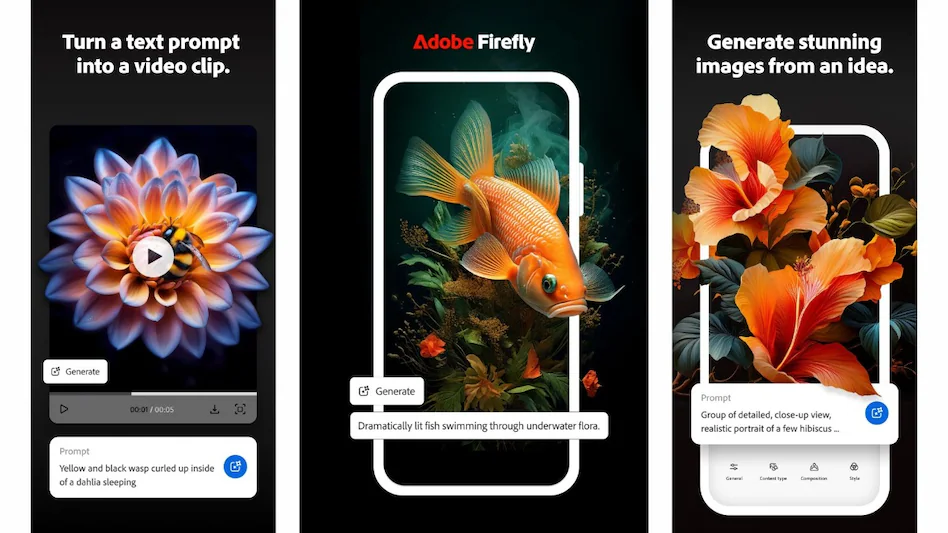
Here’s what users can expect from the mobile app version of Adobe Firefly:
Text-to-Image Generation
Users can type a prompt (e.g., “a futuristic city at sunset with flying cars”) and instantly generate high-quality, stylistically unique images. With customizable styles, aspect ratios, and filters, the app brings your imagination to life with just a few taps.
Text Effects and Typography AI
Firefly Mobile allows you to generate eye-catching text designs by simply entering the desired word and style prompt. Whether you’re creating headers for social posts or designing logos, the typography engine offers rich, AI-generated designs on demand.
Style Transfer and Visual Variations
Need multiple versions of a design? The mobile app supports one-tap style transfer and image variation, letting users quickly generate similar concepts with different moods, colors, or aesthetics—all powered by prompt tuning and advanced AI interpretation.
Personalization and Branding
With Firefly Mobile, creators can define brand guidelines, color palettes, and visual identities that sync with other Adobe Creative Cloud tools. The app remembers your preferences, speeding up repetitive tasks while maintaining a cohesive look across your projects.
Cloud Sync and Integration
Firefly Mobile integrates seamlessly with Adobe Express, Photoshop, Illustrator, and Lightroom, making it part of a fluid mobile-to-desktop creative process. All your generated content is saved to your Adobe cloud account and can be used instantly across platforms.
Designed for Creators on the Move
Adobe has re-engineered the Firefly experience to be touch-first and intuitive. The app interface is clean, minimal, and gesture-based, ensuring smooth navigation and real-time previewing on even smaller screens. Whether you’re using a smartphone, iPad, or foldable device, the UI scales beautifully to provide maximum control without sacrificing usability.
This makes Firefly Mobile particularly powerful for:
- Content creators and influencers posting on TikTok, Instagram, and YouTube.
- Marketing teams producing fast-turnaround assets in client meetings or on business trips.
- Design students and freelancers sketching ideas while commuting or waiting between sessions.
- Illustrators and concept artists who prefer to brainstorm ideas while outdoors or in cafés.
Commercial Use and Licensing
Just like the desktop version, Adobe Firefly Mobile is trained on licensed content and public domain assets—ensuring that everything you create is safe to use for commercial purposes. This is a massive win for small businesses, agencies, and entrepreneurs who want to scale fast while staying compliant with copyright standards.
Adobe has reaffirmed that content generated through Firefly, including mobile creations, carries clear usage rights for social media, branding, merchandising, and more. No guesswork. No legal gray zones.
Pricing and Access

Firefly Mobile is free to download from the Apple App Store and Google Play Store. It comes with a limited number of monthly Generative Credits that allow users to generate AI-based content. For extended use, users can subscribe to a Creative Cloud plan that includes additional credits, storage, and access to premium features.
If you’re already a Creative Cloud subscriber, especially to plans like Photoshop, Illustrator, or Adobe Express, Firefly Mobile is included at no additional cost and links directly to your existing account.
Industry Impact and User Feedback
Since its soft rollout in select markets, Firefly Mobile has received overwhelmingly positive feedback for its performance, design simplicity, and output quality. Creators have praised its ability to:
- Reduce turnaround time for design mockups.
- Spark creative ideas during brainstorming sessions.
- Help non-designers produce professional-grade content.
- Offer AI image generation without violating copyright norms.
Many industry analysts see Firefly Mobile as Adobe’s strategic move to future-proof its position in an increasingly mobile-first creative world. With competitors like Canva and Fotor expanding their mobile AI offerings, Adobe is now clearly signaling that it intends to lead, not follow.
Real-World Use Cases
Social Media Marketing
Create engaging, scroll-stopping visuals in minutes using AI-powered prompts tailored to your niche, such as fashion, tech, or food.
Branding Projects
Mock up brand logos, typography, and color palettes on the go with real-time preview and style controls.
Storyboarding and Concept Art
Artists and content planners can generate multiple visual scenes based on narrative prompts for storyboards, pitches, or prototyping.
Event Promotion
Design flyers, banners, and invites using AI text effects and images for events, concerts, or product launches directly from your phone.
How to Get Started
Getting started with Adobe Firefly Mobile is simple:
Download the App
Visit the App Store or Google Play and search for “Adobe Firefly.”
Sign in with Adobe ID
Log in or create a free Adobe account to begin using the app.
Start Creating
Explore the text-to-image tool, type in a creative prompt, select a style, and generate your first artwork.
Export or Share
Once your asset is ready, export it to your camera roll, Creative Cloud, or directly to social platforms.
Future Roadmap
Adobe has already hinted at upcoming features for Firefly Mobile, including:
- Voice-to-Image generation
- AI-powered layout suggestions for mobile presentations
- Collaboration tools for team projects
- Motion graphics and video prompt features
These developments aim to make Firefly not just a tool for image generation, but a complete mobile-first creative suite.
FAQ’S
Is Adobe Firefly Mobile free to use?
Yes, Adobe Firefly Mobile is free to download and use with limited generative credits. For additional usage, users can subscribe to a Creative Cloud plan that includes more credits and premium features.
What can I create using Adobe Firefly Mobile?
You can generate AI-powered images, text effects, stylized typography, and creative variations using text prompts. It’s perfect for content creation, social media graphics, branding, and concept design.
Does Firefly Mobile work with other Adobe apps?
Yes, Firefly Mobile integrates seamlessly with Adobe Creative Cloud apps like Photoshop, Illustrator, Lightroom, and Adobe Express. You can sync your work across devices and continue editing on desktop or web.
Is content created in Firefly Mobile safe for commercial use?
Yes, Adobe ensures that all Firefly-generated content is trained on licensed and public domain data, making it safe for personal and commercial projects without copyright concerns.
Which devices support Adobe Firefly Mobile?
Adobe Firefly Mobile is available on both iOS and Android devices. It supports a wide range of smartphones and tablets, optimized for touch and stylus-based input.
Final Thoughts
The launch of Adobe Firefly Mobile represents more than just a new app—it’s a major leap forward in accessible, ethical, and AI-enhanced creativity. It levels the playing field for creators everywhere by removing the traditional barriers of expensive hardware and software.
Whether you’re a seasoned designer or just beginning your creative journey, Firefly Mobile places the full power of Adobe’s creative intelligence right at your fingertips.
